
Categories
Recent Posts
- GoTo Meeting Tips
- Access Denied to files in an Amazon S3 Bucket
- sp_SDS Stored Procedure updated to work with SQL Server 2008 R2
- System.Security.AccessControl.PrivilegeNotHeldException error during SharePoint Products Configuration Wizard on MOSS 2007 or SharePoint 2010
- Batch File to Slipstream Service Pack (SP) and Cumulative Updates (CU) for MOSS 2007 or SharePoint 2010
Tags
backconnectionhostnames
crash router msn
custom column
default gateway disappears
disable shutdown event tracker
error opening exe
exe permissions
externalize blob
externalize sharepoint data
facebook spam
filezilla server
firewall rules filazilla
full installation
http redirect
https
https redirect
IIS
iis7
iis 7 installation
IIS installation
index server configuration
installing cumulative updates
load balance central administration
magic default gateway
missing default gateway
moss advanced search
nlb
no default gateway
redirect http to https
search column
sharepoint 2010 cumulative updates
sharepoint 2010 farm build
sharepoint 2010 farm configuration
sharepoint 2010 farm installation
sharepoint data externalization
shutdown event tracker
shutdown tracker
SMTP
storagepoint
Windows 7
windows firewall configuration
windows live messenger crash
windows server 2008
wlbs
x86
Unique Page Views
- 218
Advertisement
Error when opening an EXE file |
Apr
26
|
| « Automatically Redirect HTTP requests to HTTPS on IIS 7 | Install and Configure NLB (WLBS) on Windows Server 2008 » |
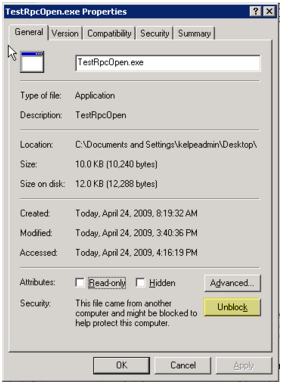
When opening an EXE you receive the following error message: "Windows cannot access the specified device, path, or file. You may not have the appropriate permissions to access the item."

To correct this issue, right click the EXE and select "Unblock". You will now be able to open the file. This annoying "feature" is part of the Internet Explorer Enhanced Security component, if you remove this from add/remove programs you will not have this issue anymore.
This entry was posted
on Sunday, April 26th, 2009 at 1:11 pm and is filed under General.
You can follow any responses to this entry through the RSS 2.0 feed.
You can leave a response, or trackback from your own site.


1 Comment so far
Thanks for ur info
Trackbacks on this post